

Windy is your AI agent, available in Slack and through chat in the Windmill Dashboard. Windy exists to help you navigate some of the complexities of your growing team. Windy can ask your team questions, answer questions about your team, help facilitate feedback, collect agenda items, and catch you up on what you’ve missed. Windy is always there for you—just tag @Windy in Slack, or open one of the in-platform chat surfaces in the Windmill Dashboard.Documentation Index
Fetch the complete documentation index at: https://help.gowindmill.com/llms.txt
Use this file to discover all available pages before exploring further.
Where you can talk to Windy
You’re always talking to the same Windy, no matter where you start the conversation. Today, Windy is available in:- Slack — DM Windy directly or tag @Windy in any channel Windy is in
- The Windmill homepage — Use the Ask Windy a question box at the top of your homepage
- Employee profiles — Chat with Windy in context about a specific teammate
- Pulse pages — Ask Windy about pulse results and trends
What Windy does
Windy helps you stay connected to your team without constant check-ins or manual status updates. Here’s how: Collects feedback at the right moments Windy uses organizational network analysis to detect when colleagues have been working together. Windy reaches out via Slack right after collaboration happens to collect timely, relevant feedback. Helps with Self Reviews, Peer Reviews and Upward Reviews If you run performance reviews on Windmill, Windy will help you run reviews, collecting feedback from the team in an easy-to-use conversational flow. Helps run your 1:1s Windy can help collect agenda items, catch you up on previous action items or offer suggestions about what to cover. Generates weekly recaps Every week, Windy automatically creates a recap of each team member’s activities based on your connected tools (GitHub, Jira, Google Drive, etc.). These recaps surface accomplishments that might otherwise go unnoticed. Follows up automatically If someone misses a message, Windy follows up with a reminder. You don’t need to chase people down for responses.Who interacts with Windy
In short, the whole company! Windy takes everything within the platform and makes it easily accessible in Slack. Everyone on your team Windy reaches out to individual contributors for feedback on teammates, responses to pulse surveys, and updates on their work. Employees interact with Windy entirely in Slack—no dashboard access required. Managers Windy surfaces insights about team members’ activities, feedback they’ve received, and responses to check-ins. Managers view this information in the Windmill dashboard and can also interact with Windy in Slack. Admins Admins configure Windy’s settings, control which Slack channels Windy can access, and manage integrations. Like managers, admins can view reports in the dashboard and interact with Windy in Slack.Replying to Windy in Slack
When replying to Windy in Slack - just make sure you reply in threads. That way, Windy can keep your conversation in a single thread. If you don’t reply within a thread, Windy will send you a reminder.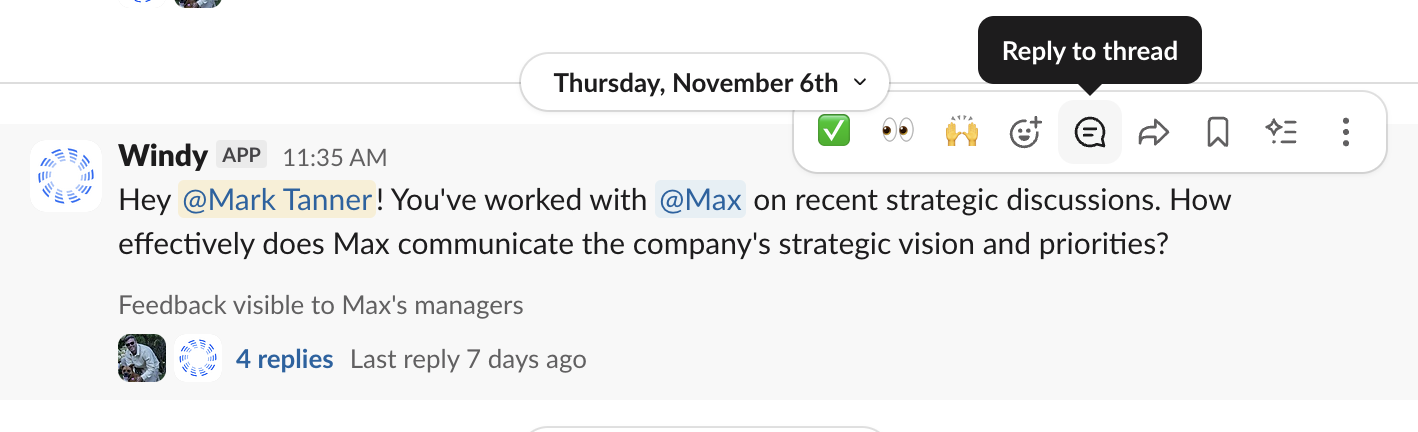
Windy learns over time
The more systems you connect and the more Windy interacts with your team, the better Windy becomes at identifying the right moments to reach out and the right people to ask.Windy will become your go-to resource for running your team. The more you use
Windmill, the more useful Windy’s insights become.